Showing posts with label weblogic. Show all posts

Sunday, April 4, 2021

Installation of Weblogic 12c (12.2.1.4) on Linux

 Prerequisites:

a. Download JDK1.8 (jdk-8u281-linux-x64.tar.gz)   from below link.

https://www.oracle.com/java/technologies/javase/javase-jdk8-downloads.html 

b. Download weblogic 12.2.1.4 (fmw_12.2.1.4.0_wls_Disk1_1of1.zip) from below link.

https://www.oracle.com/in/middleware/technologies/weblogic-server-downloads.html

c. Create user webadmin  who installs and configures weblogic server.

useradd webadmin

d. Create the prerequisite directory to hold oracle WebLogic software

mkdir /u01/app/web_12214

mkdir  /u01/app/oraInventory

e. create /etc/oraInst.loc  & add the below lines.

inventory_loc=/u01/app/oraInventory

inst_group=webadmin

f. Stage the software under /u01/app/softwares  .

[webadmin@jaytch softwares]$ pwd

/u01/app/softwares


[webadmin@jaytch softwares]$ ls -ltr

total 986544

-rw-rw-r--. 1 opc      opc      866494253 Apr  4 07:56 fmw_12.2.1.4.0_wls_Disk1_1of1.zip

-rw-rw-r--. 1 webadmin webadmin 143722924 Apr  4 10:27 jdk-8u281-linux-x64.tar.gz


[webadmin@jaytch softwares]$ unzip fmw_12.2.1.4.0_wls_Disk1_1of1.zip

Archive:  fmw_12.2.1.4.0_wls_Disk1_1of1.zip

  inflating: fmw_12.2.1.4.0_wls.jar


[webadmin@jaytch app]$ cd /u01/app

[webadmin@jaytch app]$ tar -zxvf  /u01/app/softwares/jdk-8u281-linux-x64.tar.gz


Installation:

 export PATH=/u01/app/jdk1.8.0_281/bin:$PATH

 cd /u01/app/softwares/

 java -jar fmw_12.2.1.4.0_wls.jar

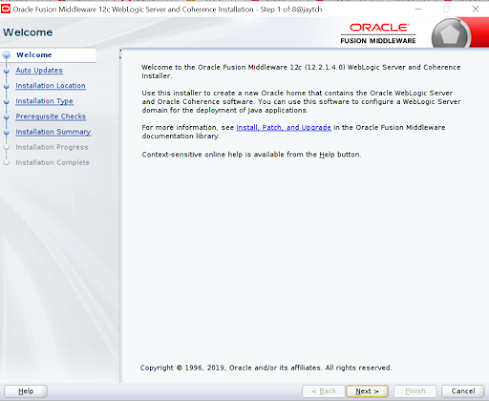
After the graphical wizard opens, use the guidelines in the following table to install WebLogic Server 12c (12.2.1):
StepWindow/Page DescriptionChoices or Values
a.Step 1 of 9 - WelcomeClick Next.
b.Step 2 of 9 - Auto UpdatesSelect Skip Auto Updates.
Click Next.
c.Step 3 of 9 - Installation LocationEnter /u01/app/web_12214 for Oracle Home.
Click Next.
d.Step 4 of 9 - Installation TypeSelect Complete with Examples.
[ If it is production box, Please choose weblogic server ]
Click Next.
e.Step 5 of 9 - Prerequisite ChecksClick Next.
f.Step 6 of 9 - Security UpdatesUnselect I wish to receive security updates via My Oracle Support.
Click Next.
g.My Oracle Support Username/Email Address Not SpecifiedClick Yes.
h.Step 7 of 9 - Installation SummaryClick Install.
i.Step 8 of 9 - Installation ProgressClick Next.
j.Step 9 of 9 - Installation CompleteClick Finish.


Environment File Setup:

Create the env file $HOME/web12c.env 

ORACLE_HOME=/u01/app/web_12214; export ORACLE_HOME
MW_HOME=$ORACLE_HOME ; export MW_HOME
WLS_HOME=$MW_HOME/wlserver; export WLS_HOME
DOMAIN_HOME=/u01/app/web_12214/user_projects/domains/jay_domain; export DOMAIN_HOME
JAVA_HOME=/u01/app/jdk1.8.0_281; export JAVA_HOME
export PATH=$JAVA_HOME/bin:$ORACLE_HOME/OPatch:$PATH


Creating Weblogic Domain:

source $HOME/web12c.env
$ORACLE_HOME/oracle_common/common/bin/config.sh


Start the Services:

Create the boot.properties under  $DOMAIN_HOME/WLS_DEMO/security folder .

nohup $DOMAIN_HOME/bin/startNodeManager.sh > /dev/null 2>&1 &
nohup $DOMAIN_HOME/startWebLogic.sh > /dev/null 2>&1 &
nohup $DOMAIN_HOME/bin/startManagedWebLogic.sh WLS_DEMO  > /dev/null 2>&1 &


Monday, June 20, 2016

Exception in thread "main" java.lang.OutOfMemoryError while applying weblogic psu patch (bsu.sh)

When applying weblogic patch using smart update (bsu.sh),  through command line i received an error

Exception in thread "main" java.lang.OutOfMemoryError: GC overhead limit exceeded       
 at java.lang.reflect.Method.copy(Method.java:151)        
 at java.lang.reflect.ReflectAccess.copyMethod(ReflectAccess.java:136)        
 at sun.reflect.ReflectionFactory.copyMethod(ReflectionFactory.java:300)         
at java.lang.Class.searchMethods(Class.java:2799)         
at java.lang.Class.getMethod0(Class.java:2813)         
at java.lang.Class.getMethod(Class.java:1663)      


Now, open bsu.sh alter the values of Xms and Xmx (from default 256 to 1024) and rerun.

Failure When Trying to Patch weblogic Using bsu Command: Encountered unrecognized patch ID


I have downloaded and unzipped the weblogic psu patch in /shared/patches and tried to apply using below command  bsu.sh(smart update).

./bsu.sh -install -patch_download_dir=/shared/patches/ -patchlist=DEM4 -prod_dir=/as11g/jay_tch/product/middleware/11.1/wlserver_10.3

It throws Encountered unrecognized patch ID:XXXXX


Solution:

 To resolve this error, extract the patch files (one xml file and the jar file with Path ID name) in to {MW_Home}/utils/bsu/cache_dir directory.

If cache_dire directory is not available in {MW_Home}/utils/bsu directory, then create it and copy the files.

Saturday, June 18, 2016

How to apply PSU Patch on Weblogic 10.3.6.0

1. Patches have been downloaded  to jayaptch2:/shared/APRIL_PSU_2016/11g_fusion
2. unzip  the patch to $MW_HOME/utils/bsu/cache_dir
3. cd $MW_HOME/utils/bsu
4. cp bsu.sh bsu.sh.may17
5. Modify xms and xmx from 256 to 1024.
MEM_ARGS="-Xms1024m -Xmx1024m"
6. ./bsu.sh -install -patch_download_dir=/as11g/jay_tch/product/middleware/11.1/utils/bsu/cache_dir/ -patchlist=DEM4 -prod_dir=/as11g/jay_tch/product/middleware/11.1/wlserver_10.3

output:
/as11g/jay_tch/product/middleware/11.1/utils/bsu
iweboas1@ofaptch2:as11g> e_dir/ -patchlist=DEM4 -prod_dir=/as11g/jay_tch/product/middleware/11.1/wlserver_10.3
Checking for conflicts.....
No conflict(s) detected

Installing Patch ID: DEM4..
Result: Success


7. To verify:

./bsu.sh -prod_dir=/as11g/jay_tch/product/middleware/11.1/wlserver_10.3 -status=applied -verbose -view


                         [OR]

. $MW_HOME/wlserver_10.3/server/bin/setWLSEnv.sh


/as11g/jay_tch/product/middleware/11.1/utils/bsu
iweboas1@ofaptch2:as11g> java weblogic.version

WebLogic Server 10.3.6.0.160419 PSU Patch for BUG22505423 TUE FEB 09 15:54:42 IST 2016
WebLogic Server 10.3.6.0  Tue Nov 15 08:52:36 PST 2011 1441050

Use 'weblogic.version -verbose' to get subsystem information

Use 'weblogic.utils.Versions' to get version information for all modules

Wednesday, May 18, 2016

Decrypt Weblogic password from config files

Today I have installed weblogic  server and tried to start after installation.But it didn't start and  threw below error

weblogic.security.SecurityInitializationException: Authentication for user weblogic denied.


I have given the same password(YXXGEDIUJLIKEBC1) which I had given during installation. Now situation became bit tricky. I had a dilemma whether to reinstall or not. Then I started to debug like below.

Decrypt weblogic password from config files & proceed with the configuration.


Below are the steps to decrypt weblogic password.

Save below code in /tmp/decrypt.py


import os
import weblogic.security.internal.SerializedSystemIni
import weblogic.security.internal.encryption.ClearOrEncryptedService

def decrypt(agileDomain, encryptedPassword):
    agileDomainPath = os.path.abspath(agileDomain)
    encryptSrv = weblogic.security.internal.SerializedSystemIni.getEncryptionService(agileDomainPath)
    ces = weblogic.security.internal.encryption.ClearOrEncryptedService(encryptSrv)
    password = ces.decrypt(encryptedPassword)

    print "Plaintext password is:" + password

try:
    if len(sys.argv) == 3:
        decrypt(sys.argv[1], sys.argv[2])
    else:
                print "Please input arguments as below"
                print "         Usage 1: java weblogic.WLST decryptWLSPwd.py  "
                print "         Usage 2: decryptWLSPwd.cmd "
                print "Example:"
                print "         java weblogic.WLST decryptWLSPwd.py C:\Agile\Agile933\agileDomain {AES}JhaKwt4vUoZ0Pz2gWTvMBx1laJXcYfFlMtlBIiOVmAs="
                print "         decryptWLSPwd.cmd {AES}JhaKwt4vUoZ0Pz2gWTvMBx1laJXcYfFlMtlBIiOVmAs="
except:
    print "Exception: ", sys.exc_info()[0]
    dumpStack()
    raise


Get the encrypted password for weblogic. since it is a fresh installation,we don't have boot.properties files.To search encrypted password,grep like below

cd $DOMAIN_HOME
grep -R "{AES}"   *

so we need to get it from below locaiton.

Weblogic password: $DOMAIN_HOME/init-info/security.xml

init-info/security.xml:  <user name="weblogic" password="{AES}418Va/Twg/g5sc0ycaV+isOtn3sm1yukOS6MfLS4ynltAsRSE6UcRWwtBn42EZLB" description="This user is the default administrator." isAdmin="true">


Node Manager password : $DOMAIN_HOME/init-info/config-nodemanager.xml

<nod:password>{AES}g3OWmrfYmB4CREgL8WATHkeF8dHZKkDzbCBEmojBipvPrS+77r3otrjlMk0EsLiE</nod:password>


cd $DOMAIN_HOME

/as12c/jaytrn/product/middleware/12.1.3/user_projects/domains/CustAppDom
. /as12c/jaytrn/product/middleware/12.1.3/user_projects/domains/CustAppDom/bin/setDomainEnv.sh

/as12c/jaytrn/product/middleware/12.1.3/user_projects/domains/CustAppDom

Script usage : java weblogic.WLST /tmp/decrypt.py  $DOMAIN_HOME <ENCRYPTED_PWD>

output:

jay::raapjay1trn1> java weblogic.WLST /tmp/decrypt.py .  {AES}418Va/Twg/g5sc0ycaV+isOtn3sm1yukOS6MfLS4ynltAsRSE6UcRWwtBn42EZLB

Initializing WebLogic Scripting Tool (WLST) ...

Welcome to WebLogic Server Administration Scripting Shell

Type help() for help on available commands

Plaintext password is:????????????????


Strange,I have given characters,but it shows questionmarks above.But it worked ,Now I am able to start weblogic with the password ????????????????


We will try to decrypt nodemanger password as well

/as12c/jaytrn/product/middleware/12.1.3/user_projects/domains/CustAppDom
jay::raapjay1trn1> java weblogic.WLST /tmp/decrypt.py .  {AES}g3OWmrfYmB4CREgL8WATHkeF8dHZKkDzbCBEmojBipvPrS+88r3otrjiMk0EsYiE

Initializing WebLogic Scripting Tool (WLST) ...

Welcome to WebLogic Server Administration Scripting Shell

Type help() for help on available commands

Plaintext password is: YZZGEDIUJLIKEBC1


Change Weblogic password from ???????????????? to YXXGEDIUJLIKEBC1:

a) Start Webloigc with password ???????????????? and login to console

b) Access the Admin server console with the URL https://<machine.domain>:<port>/console

C) Login to Admin server console as user weblogic and provide its password.

d) Navigate to Security Realms->myrealm->Users and Groups->choose weblogic->Passwords

e) Provide the new password and save it.

f)  Navigate to Security Realms->myrealm->Users and Groups->choose OracleSystemUser->Passwords
    Provide same password as for the weblogic user and save it.

g)  Navigate to Security Realms->myrealm->Users and Groups->choose weblogic_mntr->Passwords
    Provide same password as for the weblogic user and save it.

h)  Click on 'Activate Changes' in the left panel.

i)  Modify boot.properties file also (since it is fresh installation,I didn't setup boot.properties file)

j) Restart weblogic server

Wednesday, May 11, 2016

How to start weblogic server after improper shutdown

Today one of my application server got rebooted automatically due to insufficient memory.When we tried to start weblogic ,we were getting below exception in logs.

"Reason: weblogic.store.PersistentStoreFatalException: [Store:280105]The persistent file store "UMSJMSFileStore_auto_2" cannot open file UMSJMSFILESTORE_AUTO_2000000.DAT.> 
weblogic.management.DeploymentException: java.io.IOException: Error from fcntl() for file locking, Resource temporarily unavailable, errno=11"


We  need to do below steps to start weblogic.


1. From your ...domains/[DOMAIN] directory (and below) find and move all *.DAT files

mkdir /tmp/bkup
export BKUP_DIR=/tmp/bkup
cd $DOMAIN_HOME
find . -name *.DAT
find . -name *.DAT   -exec mv -t $BKUP_DIR  {} \;


2. Find and move all lok files in a similar method

cd $DOMAIN_HOME
find . -name *.lok
find . -name *.lok   -exec mv -t $BKUP_DIR  {} \;


3. In case if you configured JMS,we need to remove *.DAT files from the jms location as well.We have SOA managed server with clustering.our second node got rebooted.so we need to find the files which contains *AUTO_2000000* in name and move


cd /u01/oracle/config/domains/soa_domain
find . -name *AUTO_2000000*
find . -name *AUTO_2000000*  -exec mv -t $BKUP_DIR  {} \;


4.Mostly persistent store location will be inside domain_home.But in our case(SOA) we stored it in the different location.so we had to  move the *.DAT file from default persistent stores  location.

cd /u01/oracle/config/domains/soa_domain
find . -name _WLS*2000000*DAT
find . -name _WLS*2000000*DAT -exec mv -t $BKUP_DIR  {} \;

5.Now try to start Weblogic,Hopefully it will start.


How to Compile Forms , Reports & Custom.pll in R12.2

How to Compile Custom.pll   cd $AU_TOP/resource  cp CUSTOM.plx CUSTOM.plx_bkup  cp CUSTOM.pll CUSTOM.pll_bkup  frmcmp_batch module=CUSTOM.pl...